
 Google Docs Integration
One-click AI detection in Google Docs.
Open any Google Doc and use Pangram to scan your document and view writing playback with additional insight on AI-generated content.

Trusted by
Global Partners




How it works
All it takes is one click.
001
Install & set up
Visit the Chrome Web Store and search for "Pangram AI Detection." Follow the setup instructions to sign in or make an account.
002
Scan for AI
Open a document. You should see a button in the top right corner of the Google Doc that says "Scan for AI." Pangram will scan the entire document.
003
Full analysis
Click "Full analysis" and you will be brought to the Pangram dashboard to see a section-by-section AI analysis, phrase highlights, and more.
For Educators
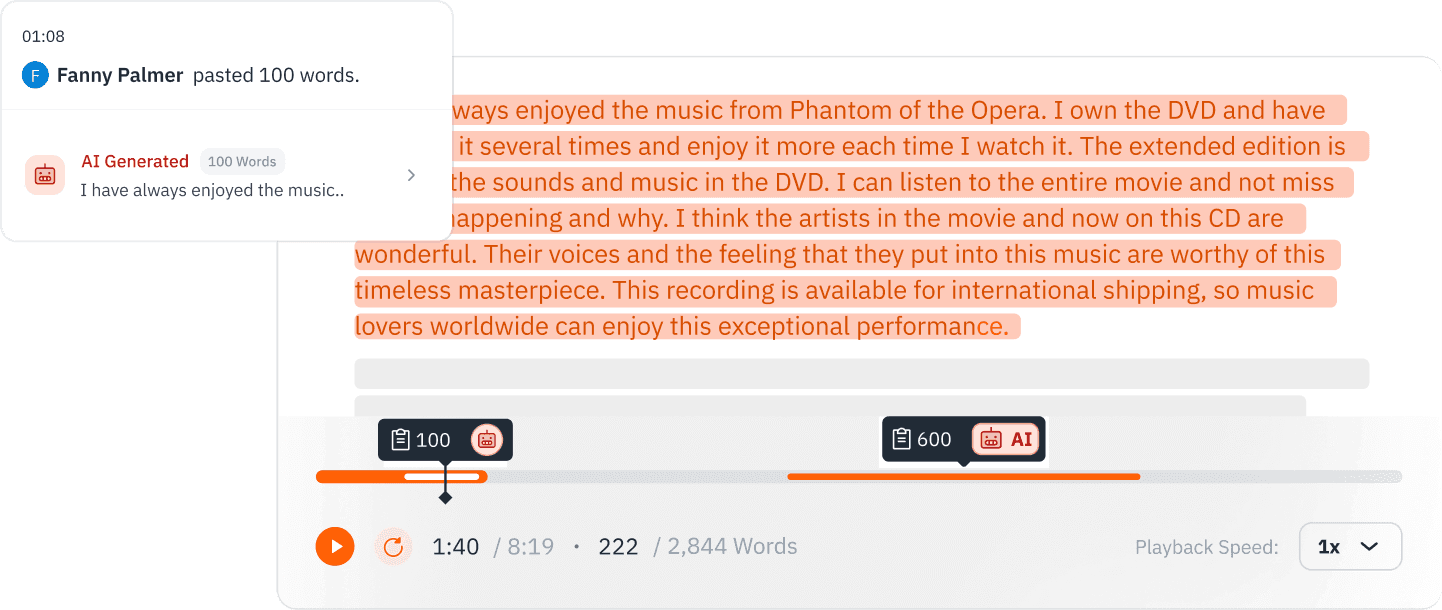
View writing playback on Google Docs.
Google Docs automatically saves the version history of a document. As it is written, Google Docs will periodically save snapshots, each with a timestamp indicating when the snapshot was taken. This is a good way to examine the writing process, and an additional tool when dealing with a plagiarism case.
More ways to check
Check a section, share the result, or upload the file.
Check a section
If you just want to check a certain section, simply highlight text, right click, and click "Check text for AI." This will only scan the selected section of text.
Share the result
To share the result, click "Share" in the bottom right corner to get a result that can be viewed by anyone with the link.
Use the Pangram Dashboard
The Pangram dashboard also natively handles .docx and .pdf files. Export the document as a .docx file, then on the Pangram Dashboard Text Detection page, click the Upload tab, drag and drop the file, and click "Check for AI."
Integrations
Also in your LMS.
Pangram is also integrated into the Chrome browser, Google Docs, and many learning management systems like Google Classroom and Canvas. Teachers also use our browser extension to check assignments directly inside Google Docs or their LMS grading environment.
Integrated with Canvas, Google Classroom, Moodle, Brightspace, Schoology, Blackboard, and Google Docs.

Check any Google Doc for AI writing.
Many teachers work with student writing directly in Google Docs. Luckily, there's an easy way to check for AI writing in Google Docs with just one click.